GoHighLevel AI Studio Model Picker: Claude, GPT, Gemini
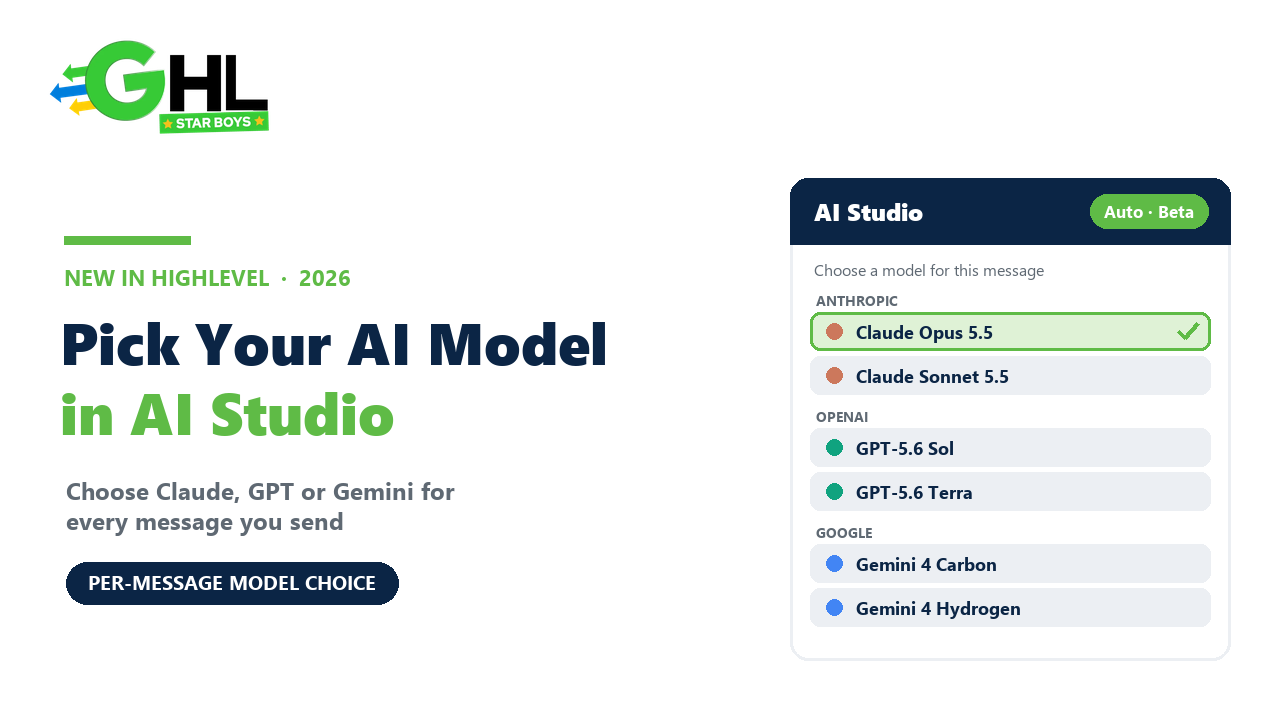
GoHighLevel AI Studio now lets you choose which AI model builds each message. A new "Auto · Beta" picker under the chat box offers Claude Opus 5.5, Claude Sonnet 5.5, GPT-5.6 Sol, GPT-5.6 Terra, Gemini 4 Carbon and Gemini 4 Hydrogen. It's in beta for Founder Plan agencies and AI Employee plan sub-accounts, billed per message at each model's cost.
Picture a normal week in an agency. You ask AI Studio for a six-page site for a roofing client: home, services, financing, reviews, a quote form and a booking page. It gets most of the way there, but the financing page keeps coming out thin, and you've rewritten the prompt three times. Ten minutes later you ask it to change one button from "Get a Quote" to "Book a Free Roof Inspection." Until this week, both of those requests ran on the same models, you had no say in which, and nothing told you which model had done the work. On November 23, 2026, HighLevel changed that.
What is the GoHighLevel AI Studio model picker?
The model picker is a new control in GoHighLevel AI Studio, HighLevel's build-by-prompt tool for websites, funnels, forms and simple apps. It lets you choose which AI model handles each message you send, instead of every message running on the same default. It shows up as an "Auto · Beta" chip under the chat box, both on the AI Studio dashboard and inside the builder.
Three things make it more than a dropdown. You can switch per message, so a heavy build and a tiny copy edit no longer have to run on the same model. Every finished turn is labelled with the model that ran it, so you can finally see which model did the work. And HighLevel says it can add or hide models without an app update, so expect the list to change as new models ship. The details in this guide come from HighLevel's official changelog entry of November 23, 2026.
Which AI models can you choose in AI Studio?
At launch the picker lists six models from three providers, grouped by provider in the menu:
- Anthropic: Claude Opus 5.5 and Claude Sonnet 5.5
- OpenAI: GPT-5.6 Sol and GPT-5.6 Terra
- Google: Gemini 4 Carbon and Gemini 4 Hydrogen
Each model in the menu carries a one-line note from HighLevel on what it does best. Read those notes in your own account rather than trusting anyone's summary, because HighLevel has said the line-up and pricing can change during the beta. The one thing HighLevel spells out directly is that premium models like Claude Opus 5.5 cost more per message than the faster ones.
A fair warning: nobody outside HighLevel has published a proper head-to-head of these six models inside AI Studio yet. If someone tells you on day one that one of them is definitively "the best for funnels," they're guessing. The useful move is to test on your own projects, and the turn labels make that easy.
How do you choose a model in GoHighLevel AI Studio?
Once you know where to look, it takes about ten seconds:
- Open your sub-account and go to AI Studio, either the dashboard or an existing project.
- Find the Auto · Beta chip directly under the chat box.
- Click it to open the model menu, grouped by provider.
- Pick a model. It applies to your next message and stays selected until you change it.
- Send your prompt. When the turn finishes, it's labelled with the model that ran it, for example "· Claude Opus 5.5".
A few behaviours are worth knowing before you rely on it. The picker locks while a turn or build is running and unlocks when it finishes, so you can't swap models halfway through a build. A new project starts on whatever model you last picked from the dashboard, which is easy to forget if you used a premium model yesterday. And when AI Studio stops to ask you a clarifying question, your answer continues on the model that turn was already using, not whatever you switch to afterwards.
What does Auto do in AI Studio?
Auto is the default, and it stays the default. In Auto mode, AI Studio picks a model for each message itself, so nothing changes for anyone who never touches the picker. HighLevel hasn't published how Auto decides, so treat it as a sensible starting point rather than a promise of the cheapest or the strongest option.
For everyday work, Auto is fine. Choosing manually earns its keep in three situations: a complex build keeps coming out wrong and you want a stronger model on it, you're doing a long run of small edits and want to keep cost down, or you want to see how two providers handle the same prompt. The turn labels keep that comparison honest, because you can see exactly which model produced which version.
Who can use the AI Studio model picker?
Right now, not everyone. HighLevel says the picker is available to agencies on the Founder Plan and to sub-accounts on the AI Employee plan (here's a breakdown of what the GoHighLevel AI Employee plan does and costs). Every other account keeps running on Auto and simply doesn't see the picker. It's a beta, so expect access, models and pricing to move. If you're not sure which plan an account is on, check its billing settings before you promise a client anything.
How much does each model cost in AI Studio?
HighLevel bills AI Studio usage at the cost of the model that ran each message, and premium models like Claude Opus 5.5 cost more per message than faster ones. The release note doesn't include a per-message price list, and HighLevel says models and pricing may change during the beta. So check usage in your own account rather than planning around a number you read online. Any price quoted on a blog, this one included, will date quickly.
Here's where cost actually leaks. A big multi-page build is a handful of messages. The thirty small tweaks afterwards (a headline, a button label, a colour, the order of the testimonials) are where message counts pile up. If all thirty run on a premium model because you forgot to switch back after the build, you've paid premium rates for work a faster model handles fine. The habit worth building is simple: go premium for the heavy lift, then drop to a faster model or Auto for the polish.
Which model should you use for which job?
HighLevel's own framing is the right one: a more capable model for a hard multi-page build, a faster and cheaper one for a quick copy edit. Here's how that plays out across typical AI Studio work. Treat it as a starting point, and check HighLevel's one-line note for each model in your account.
| Task in AI Studio | Real example | What matters most | Sensible starting choice |
|---|---|---|---|
| Full multi-page build | Six-page roofing site with a quote form and booking page | Capability | A premium model such as Claude Opus 5.5 |
| A build that keeps coming out wrong | Financing page still thin after three re-prompts | A fresh approach | A model from a different provider, then compare the labelled turns |
| Small copy edits | Change a CTA to "Book a Free Roof Inspection" | Speed and cost | A faster model, or Auto |
| Layout and styling tweaks | Reorder sections, adjust colours and fonts | Speed and cost | A faster model, or Auto |
| First drafts and exploration | Three rough homepage concepts to show a client | Speed | Auto |
| Final pass before launch | Last review before a client site goes live | Capability and care | Your strongest model, plus a human review |
Is this the same as choosing a model for the GoHighLevel AI Agent?
No, and it's worth being clear, because the two get mixed up. The AI Studio picker controls which model builds your pages, funnels and apps, message by message, inside the builder. Separately, HighLevel lets you choose the model that powers a customer-facing AI Agent, the one that actually talks to your leads, which is covered in GoHighLevel AI Agent now runs Claude and Gemini. Different product, different setting, different bill.
Both point the same way, though. HighLevel is turning model choice into a normal part of the platform rather than a fixed default, and it's shipping AI features fast. A few days before this release, Managed Agents picked up scheduled tasks, explained in this guide to GoHighLevel AI Agent Routines. For agencies, the skill is shifting from "can you use the AI" to "do you know which AI to use for which job, and what it costs."
Why does the model picker matter for agencies?
If you build one site a quarter, this is a nice-to-have. If you're an agency shipping AI Studio builds for clients every week, it changes three things.
- Margin. AI usage is now a cost line that responds to your choices. An agency doing ten client sites a month that runs every polish edit on a premium model is quietly overpaying. One that goes premium for the build and fast for the polish keeps that money.
- Quality on the hard stuff. When a complex build stalls, you're no longer stuck re-wording the same prompt to the same model. You can bring a stronger model, or a different provider's model, to the problem.
- Accountability. Turn labels mean that when part of a build goes sideways, you can see which model produced it. That helps with debugging, and with explaining your process to a client.
None of that removes the human part. A better model still builds what you ask for, and it still won't tell you that you asked for the wrong page, the wrong offer or the wrong flow. The guide on what AI Studio can and cannot do goes deeper on that ceiling. And if your team builds in AI Studio and then refines in code, the picker pairs neatly with AI Studio's GitHub sync.
Knowing which model to use, and when a human needs to step in, is exactly the judgment done-for-you teams are paid for. GHLStarboys, an official HighLevel 2026 Marketplace Award winner with 350+ vetted experts serving 1,200+ agencies, pairs AI speed with human strategy, complex automations and quality control.

It's rated 4.8 out of 5 on G2, and those reviews include real criticism the team took on board: clients flagged a timezone gap, where a complex multi-part question could take until the next day. GHLStarboys fixed it by matching each expert's hours to the client's timezone and booking standing calls for anything that needs back-and-forth. If you'd rather compare options first, this honest guide to the best GoHighLevel agencies to hire lists competitors alongside it, cons included.
The honest downsides
This is a genuinely useful release, but here's the straight version before you build a workflow around it.
- It's a beta. Models, pricing and behaviour can change, and HighLevel has said so directly.
- Most accounts can't see it yet. It's limited to Founder Plan agencies and AI Employee plan sub-accounts. Everyone else runs on Auto.
- There's no published price list. You'll learn the real cost of each model from your own usage, not from the release note.
- Auto is a black box. HighLevel hasn't said how Auto chooses, so you can't assume it's optimizing for your budget.
- No mid-build switching. The picker locks while a turn runs, so a long build finishes on the model it started with.
- A better model doesn't fix a bad brief. If the prompt is vague or the strategy is wrong, a premium model just builds the wrong thing more convincingly.
If you're new to GoHighLevel and want to try AI Studio yourself, you can start an extended GoHighLevel trial here. Be aware that during the beta the model picker is limited to the plans above, so unless your account is on one of them, AI Studio will run on Auto.
Disclosure: that is an affiliate link. If you start a GoHighLevel trial through it, GHLStarboys may earn a commission at no extra cost to you, and you can claim its onboarding bonuses.
Frequently asked questions
What is the GoHighLevel AI Studio model picker?
It's a beta control in GoHighLevel AI Studio, shown as an "Auto · Beta" chip under the chat box, that lets you choose which AI model builds each message. HighLevel launched it on November 23, 2026, and every finished turn is labelled with the model that ran it.
Which AI models are available in GoHighLevel AI Studio?
At launch: Claude Opus 5.5 and Claude Sonnet 5.5 from Anthropic, GPT-5.6 Sol and GPT-5.6 Terra from OpenAI, and Gemini 4 Carbon and Gemini 4 Hydrogen from Google. HighLevel says it can add or hide models without an app update, so the list may change.
Who can use the AI Studio model picker?
During the beta, agencies on the Founder Plan and sub-accounts on the AI Employee plan. All other accounts keep running on Auto and don't see the picker. Check your account's plan in its billing settings.
Does a premium model cost more in GoHighLevel AI Studio?
Yes. Usage is billed at the cost of the model that ran each message, so premium models like Claude Opus 5.5 cost more per message than faster ones. HighLevel hasn't published a per-message price list and says pricing may change during the beta.
What does Auto mean in GoHighLevel AI Studio?
Auto is the default setting, where AI Studio picks a model for each message itself, so nothing changes for users who never touch the picker. HighLevel hasn't published how Auto decides, so switch manually when cost or capability matters.
Is the AI Studio model picker the same as the AI Agent model setting?
No. The AI Studio picker chooses which model builds your pages, funnels and apps inside the builder. The AI Agent setting chooses which model powers a customer-facing agent that talks to your leads. They're separate products with separate settings.
The bottom line
The AI Studio model picker is a small control with a real effect on cost and quality. Use a strong model for the heavy build, drop to a faster one for the polish, and let the turn labels teach you which model works best on your kind of projects. It's beta and plan-gated, so check access and usage in your own account before you build a pricing model around it. And if you'd rather have an award-winning team handle the build, the automations and the follow-up, book a free growth call with GHLStarboys.